百度地图提供天气预报查询接口API,可以根据经纬度/城市名查询天气情况,因此可以在微信公众平台开发中调用这一接口。
调用百度地图API需要注册百度账号,然后申请AK(访问密钥),申请地址为http://lbsyun.baidu.com/apiconsole/key。
打开申请地址页面,如图4-16所示。

图4-16 应用列表
点击“创建应用”按钮,弹出创建应用页面,如图4-17所示。
“应用名称”可以随便填写,“应用类型”选择“服务端”,“启用服务”里面的选项可以全部选择,“请求校验方式”选择“sn校验方式”,然后点击“提交”按钮,回到控制台。在页面上可以看到AK参数的值,如图4-18所示。
再点击“设置”链接,可以看到该应用的SK参数,如图4-19所示。
百度地图天气预报API接口如下:
http:// api.map.baidu.com/place/v2/search
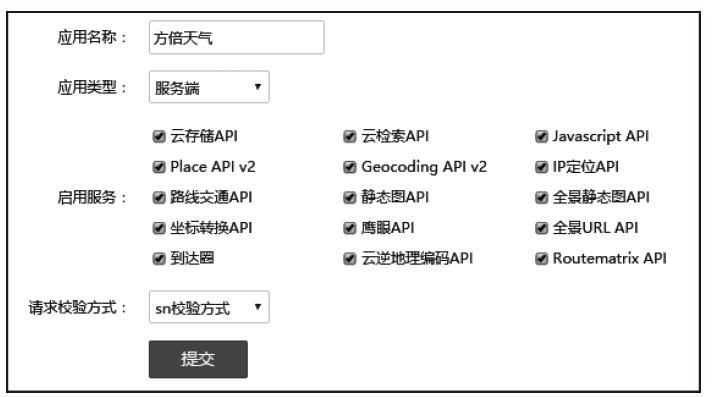
图4-17 创建应用
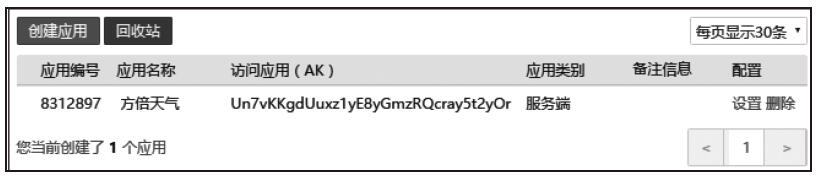
图4-18 应用的AK参数
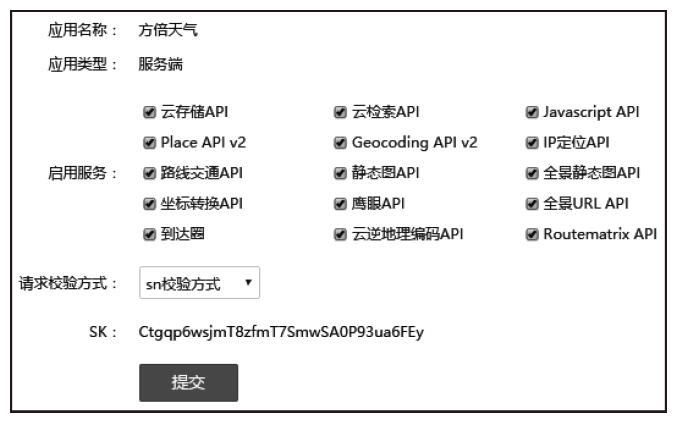
图4-19 应用的SK参数
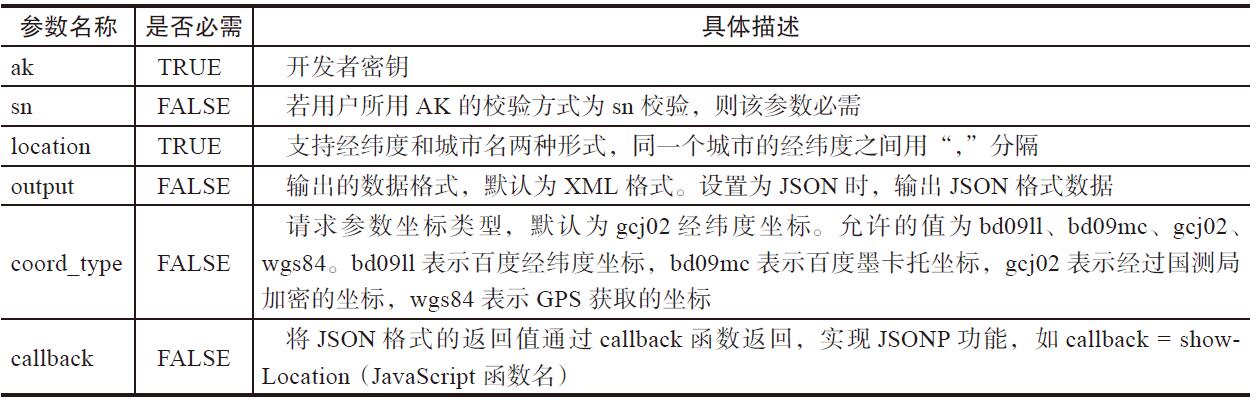
该接口的参数说明如表4-14所示。
表4-14 百度地图天气预报API参数说明
该接口调用举例如下:
http:// api.map.baidu.com/telematics/v3/weather?ak=WT7idirGGBgA6BNdGM36f3kZ&locati
on=%E6%B7%B1%E5%9C%B3&output=json&sn=66116881b46a72e3380f29989c883bec
返回结果列表如下所示:
{
    "error":0,
    "status":"success",
    "date":"2016-06-29",
    "results":[
        {
            "currentCity":"深圳",
            "pm25":"18",
            "index":[
                {
                    "title":"穿衣",
                    "zs":"炎热",
                    "tipt":"穿衣指数",
                    "des":"天气炎热,建议着短衫、短裙、短裤、薄型T恤衫等清凉夏季服装。"
                },
                {
                    "title":"洗车",
                    "zs":"不宜",
                    "tipt":"洗车指数",
                    "des":"不宜洗车,未来24小时内有雨,如果在此期间洗车,雨水和路上的泥水
                    可能会再次弄脏您的爱车。"
                },
                {
                    "title":"旅游",
                    "zs":"一般",
                    "tipt":"旅游指数",
                    "des":"天气较热,有微风,但较强降雨的天气将给您的出行带来很多的不便,若
                    坚持旅行建议带上雨具。"
                },
                {
                    "title":"感冒",
                    "zs":"少发",
                    "tipt":"感冒指数",
                    "des":"各项气象条件适宜,发生感冒概率较低。但请避免长期处于空调房间中,以
                    防感冒。"
                },
                {
                    "title":"运动",
                    "zs":"较不宜",
                    "tipt":"运动指数",
                    "des":"有较强降水,建议您选择在室内进行健身休闲运动。"
                },
                {
                    "title":"紫外线强度",
                    "zs":"弱",
                    "tipt":"紫外线强度指数",
                    "des":"紫外线强度较弱,建议出门前涂擦SPF在12-15之间、PA+的防晒护肤品。"
                }
            ],
            "weather_data":[
                {
                    "date":"周三 06月29日 (实时:31℃)",
                    "dayPictureUrl":"http:// api.map.baidu.com/images/weather/day/
                    zhongyu.png",
                    "nightPictureUrl":"http:// api.map.baidu.com/images/weather/night/
                    zhongyu.png",
                    "weather":"中雨",
                    "wind":"微风",
                    "temperature":"33 ~ 27℃"
                },
                {
                    "date":"周四",
                    "dayPictureUrl":"http:// api.map.baidu.com/images/weather/day/dayu.
                    png",
                    "nightPictureUrl":"http:// api.map.baidu.com/images/weather/night/
                    dayu.png",
                    "weather":"中到大雨",
                    "wind":"微风",
                    "temperature":"32 ~ 26℃"
                },
                {
                    "date":"周五",
                    "dayPictureUrl":"http:// api.map.baidu.com/images/weather/day/
                    dayu.png",
                    "nightPictureUrl":"http:// api.map.baidu.com/images/weather/night/
                    dayu.png",
                    "weather":"中到大雨",
                    "wind":"微风",
                    "temperature":"30 ~ 26℃"
                },
                {
                    "date":"周六",
                    "dayPictureUrl":"http:// api.map.baidu.com/images/weather/day/
                    zhenyu.png",
                    "nightPictureUrl":"http:// api.map.baidu.com/images/weather/night/
                    zhenyu.png",
                    "weather":"阵雨",
                    "wind":"微风",
                    "temperature":"32 ~ 26℃"
                }
            ]
        }
    ]
}
上述返回结果字段说明如表4-15所示。
表4-15 天气预报接口返回字段说明


根据上述接口,可编写获取天气预报的代码如下。
 1 function getWeatherInfo($cityName)
 2 {
 3     $ak = 'WT7idirGGBgA6BNdGM36f3kZ';
 4     $sk = 'uqBuEvbvnLKC8QbNVB26dQYpMmGcSEHM';
 5     $url = 'http:// api.map.baidu.com/telematics/v3/weather?ak=%s&location=%s&o
       utput=%s&sn=%s';
 6     $uri = '/telematics/v3/weather';
 7     $location = $cityName;
 8     $output = 'json';
 9     $querystring_arrays = array(
10         'ak' => $ak,
11         'location' => $location,
12         'output' => $output
13     );
14     $querystring = http_build_query($querystring_arrays);
15     $sn = md5(urlencode($uri.'?'.$querystring.$sk));
16     $targetUrl = sprintf($url, $ak, urlencode($location), $output, $sn);
17
18     $ch = curl_init;
19     curl_setopt($ch, CURLOPT_URL, $targetUrl);
20     curl_setopt($ch, CURLOPT_RETURNTRANSFER, 1);
21     $result = curl_exec($ch);
22     curl_close($ch);
23
24     $result = json_decode($result, true);
25     if ($result["error"] != 0){
26         return $result["status"];
27     }
28     $curHour = (int)date('H',time);
29     $weather = $result["results"][0];
30     $weatherArray = array("Title" =>$weather['currentCity']."天气预报", "Desc
       ription" =>"", "PicUrl" =>"", "Url" =>"");
31     for ($i = 0; $i < count($weather["weather_data"]); $i++) {
32         $weatherArray = array("Title"=>
33             $weather["weather_data"][$i]["date"]."\n".
34             $weather["weather_data"][$i]["weather"]." ".
35             $weather["weather_data"][$i]["wind"]." ".
36             $weather["weather_data"][$i]["temperature"],
37         "Description"=>"",
38         "PicUrl"=>(($curHour >= 6) && ($curHour < 18))?$weather["weather_data"][$i]
       ["dayPictureUrl"]:$weather["weather_data"][$i]["nightPictureUrl"], "Url"=>"");
39     }
40     return $weatherArray;
41 }
上述代码解读如下。
第3~16行:构造查询请求URL。
第18~22行:获取查询结果。
第24~39行:根据查询结果提取天气信息内容并封装成图文消息。
一个查询成功的结果如图4-20所示。